Supplier Payment Terms Schedule Template for Excel
Track supplier deposits and final payment schedules with this free Excel template. Compare planned versus actual dates and manage payment terms across multiple vendors. No signup required.
Free
No signup
Excel
Business
2026-07-12
What Is This Supplier Payment Terms Template?
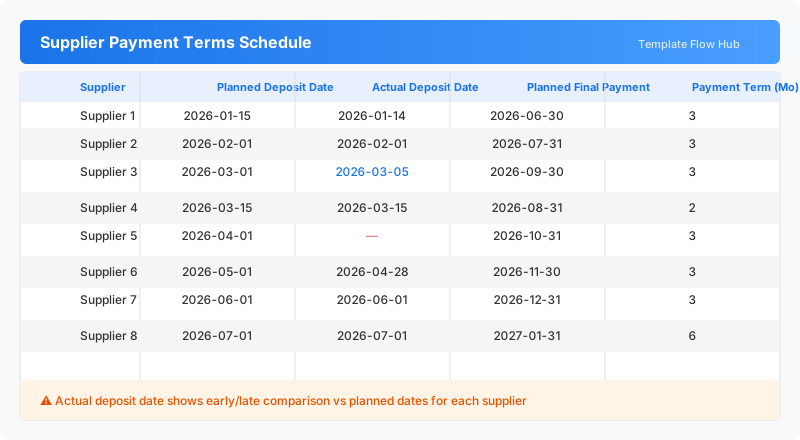
This supplier payment terms template is an Excel workbook for managing payment schedules across multiple vendors. Track planned and actual deposit dates, final payment deadlines, and payment term durations for up to eight suppliers in a single, clear schedule.
Why Use a Google Sheets Supplier Payment Terms Template?
Keeping track of supplier payment schedules is essential for maintaining good vendor relationships and avoiding late fees. This template gives procurement and accounts payable teams a simple way to plan deposits, monitor actual payment dates, and ensure payment terms are met for every supplier.
When Should You Use This Supplier Payment Terms Template?
Use this template during procurement planning at the start of a contract, when onboarding new suppliers, or during monthly accounts payable reviews. It is especially useful for businesses managing multiple suppliers with different payment term structures.
What's Included
- ✓Supplier payment schedule with planned and actual dates
- ✓Deposit date tracking for each supplier
- ✓Final payment date planning and actual comparison
- ✓Payment term duration in months
- ✓Visual payment status and variance indicators
How to Use This Template
Who This Template Is For
Available Formats
Excel (.xlsx) — Download the file and open it in Microsoft Excel, Apple Numbers, or any compatible spreadsheet application.
Customization Tips
- 💡Add additional rows for more suppliers as needed.
- 💡Color code rows to highlight suppliers needing attention.
- 💡Extend with a status column (On Time, Early, Late) using conditional formatting.
- 💡Add notes columns for payment method or invoice reference numbers.
Use Cases
- Supplier payment schedule management
- Vendor deposit and final payment tracking
- Accounts payable deadline planning
- Payment term compliance monitoring
- Procurement contract payment oversight
Download or Copy
Frequently Asked Questions
Related Templates
Last updated: 2026-07-12