Production Schedule Gantt Chart Template for Excel
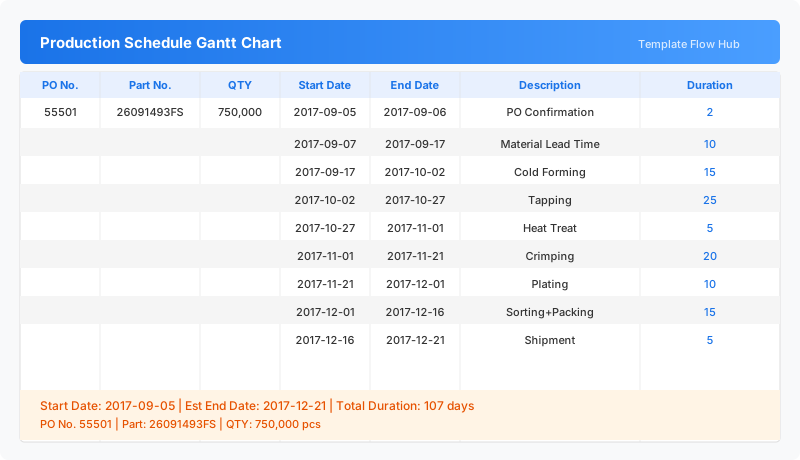
Track manufacturing production orders from PO confirmation to shipment with this free Excel template. Plan each production step with start and end dates and automatic duration calculation. No signup required.
Free
No signup
Excel
Business
2026-07-12
What Is This Production Schedule Gantt Template?
This production schedule Gantt chart template is an Excel workbook for tracking manufacturing orders from purchase order confirmation through to shipment. Each production stage—material lead time, forming, tapping, heat treat, plating, packing, and shipment—has its own start and end dates with automatic duration tracking.
Why Use a Google Sheets Production Schedule Gantt Template?
Manufacturing requires precise coordination between stages. This template gives production managers a clear timeline for each order, showing when materials arrive, when each manufacturing step happens, and when the finished goods ship. The automatic duration calculation makes it easy to spot bottlenecks and adjust schedules.
When Should You Use This Production Schedule Gantt Template?
Use this template when planning new production runs, tracking active manufacturing orders, or estimating shipment dates for customers. It is ideal for factory environments where multiple sequential production stages need coordinated scheduling.
What's Included
- ✓Purchase order and part number tracking
- ✓Order quantity and unit of measure
- ✓Start date and end date per production stage
- ✓Automatic duration calculation in days
- ✓Production stage description (PO confirmation to shipment)
- ✓Estimated end date overview
How to Use This Template
Who This Template Is For
Available Formats
Excel (.xlsx) — Download the file and open it in Microsoft Excel, Apple Numbers, or any compatible spreadsheet application.
Customization Tips
- 💡Replace the sample PO and part numbers with your actual production orders.
- 💡Add or remove production stages to match your manufacturing process.
- 💡Adjust date formatting to match your regional settings.
- 💡Add a status column to track completed vs. pending stages.
Use Cases
- Manufacturing production order scheduling
- Factory production stage planning
- Production lead time tracking
- Shipment date estimation
- Production capacity planning
Download or Copy
Frequently Asked Questions
Related Templates
Last updated: 2026-07-12