Log Sheet Template for Excel
Track daily activities and records with this free Excel log sheet template. Log events, tasks, incidents, or any recurring data. Download Excel and CSV. No signup required.
Free
No signup
Excel, CSV
Productivity
2026-06-19
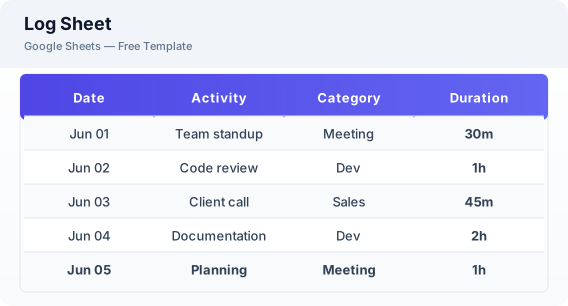
What Is This Log Sheet Template?
This log sheet template is a free Excel spreadsheet for recording daily activities, events, or any recurring data. It is fully customizable — rename columns, add categories, and set up dropdown menus to match your specific tracking needs.
Why Use a Google Sheets Log Sheet Template?
A log sheet keeps a searchable, sortable record of events and activities. Unlike paper logs, a digital log lets you filter by date or category, analyze patterns, and export data for reporting.
When Should You Use This Log Sheet Template?
Use this template whenever you need to log recurring data — daily task logs, incident reports, visitor sign-ins, equipment checks, or research observations. Customize the columns once and reuse daily.
What's Included
- ✓Date & time
- ✓Activity / event description
- ✓Category
- ✓Duration
- ✓Status
- ✓Notes
- ✓Summary counts
How to Use This Template
Who This Template Is For
Available Formats
Excel (.xlsx) — Download the file and open it in Microsoft Excel, Apple Numbers, or any compatible spreadsheet application.
CSV — Download the comma-separated values file for use in data applications, databases, or legacy spreadsheet software.
Customization Tips
- 💡Rename column headers to match your specific use case — inventory checks, visitor logs, or task tracking.
- 💡Add dropdown menus for consistent data entry using Excel data validation.
- 💡Use filter views to quickly see entries by category or date range.
Use Cases
- Daily activity logging
- Incident tracking
- Data collection
Download or Copy
Frequently Asked Questions
Related Templates
Last updated: 2026-06-19