Gantt Chart Excel
Learn how to make a Gantt chart in Excel and download a free template. Step-by-step guide with automatic timeline bars. No signup required.
Free
No signup
Excel, CSV
Productivity
2026-06-19
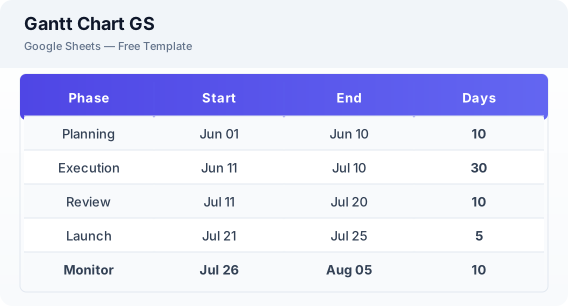
What Is This Gantt Chart GS Template?
This Excel Gantt chart template combines a step-by-step guide with a pre-built template for creating project timelines. It uses conditional formatting to generate visual timeline bars automatically based on your task dates.
Why Use a Google Sheets Gantt Chart GS Template?
Creating a Gantt chart in Excel is the most accessible way to visualize project timelines. You get professional timeline views without learning complex Gantt chart software or paying for premium tools.
When Should You Use This Gantt Chart GS Template?
Use this template when you need to quickly create a project timeline, visualize task schedules, or communicate project plans to stakeholders. For more detailed Gantt charts with dependencies, use the Gantt chart template in the related templates section.
What's Included
- ✓Task list
- ✓Start date & end date
- ✓Duration
- ✓Progress
- ✓Visual timeline
- ✓Dependencies
- ✓Project overview
How to Use This Template
Who This Template Is For
Available Formats
Excel (.xlsx) — Download the file and open it in Microsoft Excel, Apple Numbers, or any compatible spreadsheet application.
CSV — Download the comma-separated values file for use in data applications, databases, or legacy spreadsheet software.
Customization Tips
- 💡Use this template alongside the detailed Gantt chart template for larger projects.
- 💡Add more rows for complex projects — the template scales easily.
- 💡Export as PDF to share timeline views with clients who do not use Excel.
Use Cases
- Project timeline creation
- Team schedule visualization
- Task dependency mapping
Download or Copy
Frequently Asked Questions
Related Templates
Last updated: 2026-06-19