Budget Template for Excel
A simple, free Excel budget template for monthly planning. Track income, fixed and variable expenses, and savings. Download Excel and CSV. No signup required.
Free
No signup
Excel, CSV
Finance
2026-06-19
What Is This Simple Budget Template?
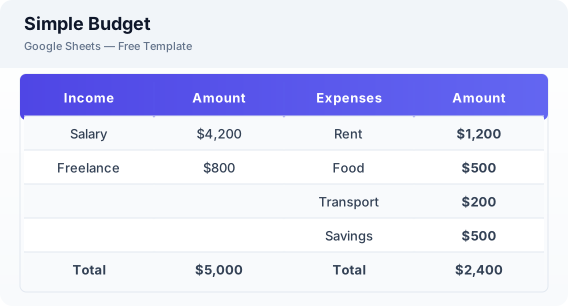
This Excel budget template is a free, simple monthly budget planner for tracking income, expenses, and savings. It is designed for beginners who want a straightforward way to manage their money without complex features.
Why Use a Google Sheets Simple Budget Template?
A budget template helps you take control of your finances. By writing down your income and expenses, you can see exactly where your money goes and make informed decisions about your spending.
When Should You Use This Simple Budget Template?
Use this template at the start of each month to plan your spending. It is ideal for budget beginners or anyone who wants a simple budgeting system. For more detailed tracking, try the budget planner or expense tracker templates.
What's Included
- ✓Monthly income
- ✓Fixed expenses
- ✓Variable expenses
- ✓Savings contribution
- ✓Total spending
- ✓Remaining balance
How to Use This Template
Who This Template Is For
Available Formats
Excel (.xlsx) — Download the file and open it in Microsoft Excel, Apple Numbers, or any compatible spreadsheet application.
CSV — Download the comma-separated values file for use in data applications, databases, or legacy spreadsheet software.
Customization Tips
- 💡Start with the fixed expenses first — these are non-negotiable and should be covered by your income.
- 💡Adjust variable expense categories each month based on your actual spending.
- 💡Use the remaining balance to decide how much extra to put toward savings or debt.
Use Cases
- Monthly budget planning
- Expense categorization
- Savings tracking
Download or Copy
Frequently Asked Questions
Related Templates
Last updated: 2026-06-19