Study Plan Progress Gantt Chart Template for Excel
Plan and track your study progress across multiple subjects with this free Excel template. Set start and end dates, monitor duration, and visualize your study timeline. No signup required.
Free
No signup
Excel
Education
2026-07-12
What Is This Study Plan Gantt Template?
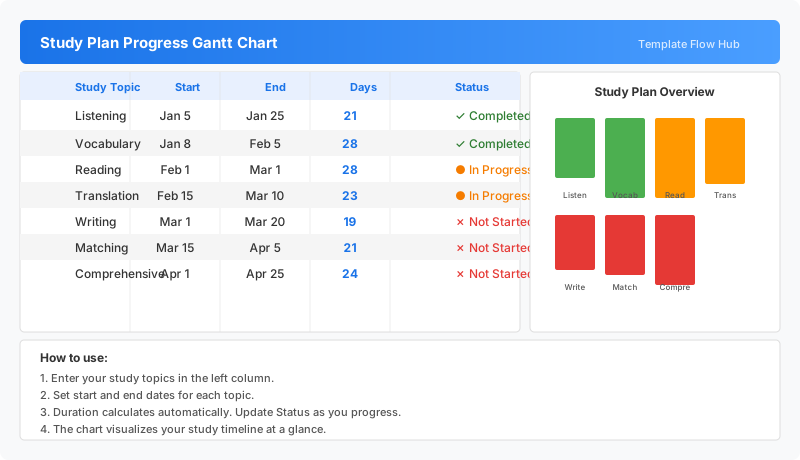
This study plan progress Gantt chart template is an Excel workbook for organizing and tracking your study schedule across multiple subjects. Plan each topic with a start and end date, track duration automatically, and monitor completion status all in one place.
Why Use a Google Sheets Study Plan Gantt Template?
Keeping a structured study plan helps you stay on track with exam preparation, language learning, or self-study goals. This template gives you a clear timeline of which subjects to study and when, with automatic duration tracking so you can see how much time each topic requires.
When Should You Use This Study Plan Gantt Template?
Use this template at the beginning of a semester, before exam season, or when starting a self-study program. It is ideal for students preparing for multiple exams who need a structured timeline to balance different subjects effectively.
What's Included
- ✓Study topic planning with start and end dates
- ✓Automatic duration calculation in days
- ✓Completion status tracking (Completed, In Progress, Not Started)
- ✓Notes column for incomplete topics
- ✓Visual chart of study timeline by subject
How to Use This Template
Who This Template Is For
Available Formats
Excel (.xlsx) — Download the file and open it in Microsoft Excel, Apple Numbers, or any compatible spreadsheet application.
Customization Tips
- 💡Add more rows for additional study topics as needed.
- 💡Use different date ranges to schedule study sessions around other commitments.
- 💡Add notes in the Remarks column for specific study resources or goals.
- 💡Sort rows by start date to prioritize upcoming topics.
Use Cases
- Exam preparation scheduling
- Semester study planning
- Language learning progress tracking
- Self-study course organization
- Academic goal monitoring
Download or Copy
Frequently Asked Questions
Related Templates
Last updated: 2026-07-12