Task Plan Gantt Chart Template for Excel
Plan and track your daily tasks with this free Excel Gantt chart template. Organize task names, start and end dates, and total duration with automatic calculations. No signup required.
Free
No signup
Excel
Business
2026-07-12
What Is This Task Plan Gantt Template?
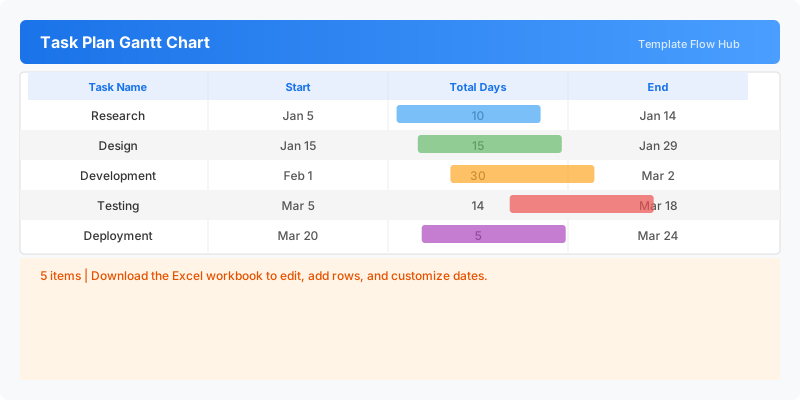
This task plan Gantt chart template is an Excel workbook for organizing and visualizing your daily work tasks. Each task has a start date, end date, and automatic duration calculation, with a Gantt-style timeline for a quick overview of your schedule.
Why Use a Google Sheets Task Plan Gantt Template?
Staying on top of multiple tasks requires a clear overview of what needs to be done and when. This template gives you a simple timeline view of your tasks with automatic duration tracking, making it easy to spot scheduling conflicts and prioritize effectively.
When Should You Use This Task Plan Gantt Template?
Use this template during daily standups, weekly planning sessions, or when managing multiple concurrent tasks. It is ideal for anyone who needs a lightweight task scheduling tool without the complexity of full project management software.
What's Included
- ✓Task name and date planning
- ✓Automatic total duration calculation
- ✓Visual Gantt timeline bars
- ✓Today marker for deadline tracking
How to Use This Template
Who This Template Is For
Available Formats
Excel (.xlsx) — Download the file and open it in Microsoft Excel, Apple Numbers, or any compatible spreadsheet application.
Customization Tips
- 💡Add more task rows as needed for larger projects.
- 💡Color code tasks by priority or category.
- 💡Use the Today marker to track progress against deadlines.
Use Cases
- Daily work task scheduling
- Project milestone tracking
- Personal task management
- Team task coordination
- Deadline monitoring
Download or Copy
Frequently Asked Questions
Related Templates
Last updated: 2026-07-12