Simple Task Plan Template for Excel
Track tasks, assignees, status, and due dates with this free Excel task plan template. Simple layout for daily task management without complex formulas. No signup required.
Excel
Cost
Free
Signup
No signup
Formats
Excel
Best for
Business
Updated
2026-07-12
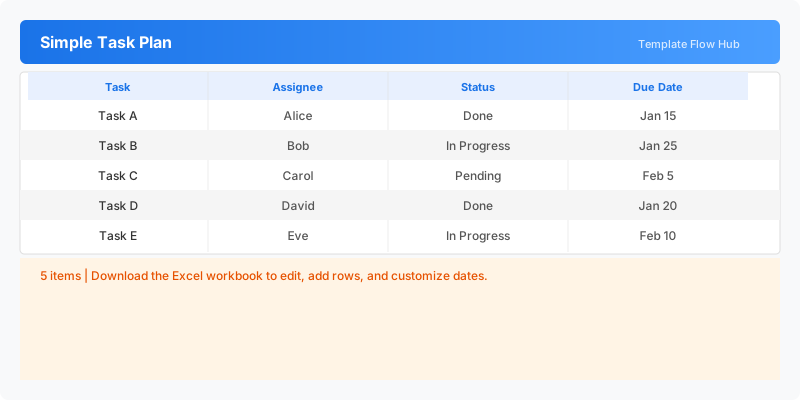
What Is This Simple Task Plan Template?
This simple task plan template is an Excel workbook for tracking tasks with assignees, status, and due dates in a clean minimal layout. Ideal for daily team coordination and simple project tracking. ENDOFFILE
Why Use a Google Sheets Simple Task Plan Template?
When Should You Use This Simple Task Plan Template?
What's Included
- ✓Task name and assignee tracking
- ✓Status column (Done, In Progress, Pending)
- ✓Due date planning
- ✓Clean minimal layout
How to Use This Template
1Download and open the Excel workbook.
2Enter each task name and assignee.
3Update the status as work progresses.
4Set due dates for deadline tracking.
Who This Template Is For
Team MembersFreelancersSmall Business OwnersStudents
Available Formats
Excel (.xlsx) — Download the file and open it in Microsoft Excel, Apple Numbers, or any compatible spreadsheet application.
Customization Tips
- 💡Add filter to sort by status or assignee.
- 💡Expand with priority column for better task triage.
Use Cases
- Daily team task tracking
- Simple to-do list management
- Task assignment coordination
- Status reporting
Download or Copy
Disclaimer: Templates may need customization for local tax, legal, or accounting requirements.
Frequently Asked Questions
Yes. The Excel workbook is free to download.
No. The XLSX file does not contain VBA macros.
Related Templates
Last updated: 2026-07-12