Recruitment Gantt Chart Template for Excel
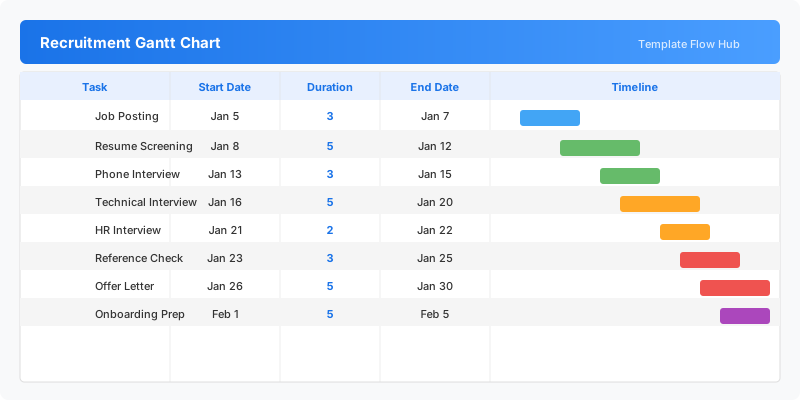
Plan your hiring process with this free Excel recruitment Gantt chart template. Track each hiring stage from job posting to onboarding with start dates, durations, and end dates. No signup required.
Free
No signup
Excel
Business
2026-07-12
What Is This Recruitment Gantt Template?
This recruitment Gantt chart template is an Excel workbook for planning and visualizing the hiring timeline from job posting to onboarding. Each stage of the recruitment process is tracked with start dates, durations, and calculated end dates, with a visual timeline showing the overall hiring flow.
Why Use a Google Sheets Recruitment Gantt Template?
Hiring involves multiple sequential stages that need careful scheduling. This template helps HR teams plan when each stage should happen, how long it should take, and visualize any scheduling conflicts or bottlenecks before they impact the hiring timeline.
When Should You Use This Recruitment Gantt Template?
Use this template when planning a new hiring campaign, scheduling multiple simultaneous job openings, or coordinating interview timelines across departments. It is ideal for HR teams who need to communicate hiring schedules clearly to hiring managers and candidates.
What's Included
- ✓Recruitment task planning (Job Posting to Onboarding)
- ✓Start date and duration tracking per hiring stage
- ✓Automatic end date calculation
- ✓Visual Gantt timeline of the hiring process
- ✓Built-in chart visualization
How to Use This Template
Who This Template Is For
Available Formats
Excel (.xlsx) — Download the file and open it in Microsoft Excel, Apple Numbers, or any compatible spreadsheet application.
Customization Tips
- 💡Rename tasks to match your specific recruitment process stages.
- 💡Adjust durations based on your typical hiring timelines.
- 💡Add extra rows for additional interview rounds or approval steps.
- 💡Use color coding to distinguish between screening, interview, and offer stages.
Use Cases
- Recruitment process scheduling
- Hiring pipeline timeline planning
- Interview stage coordination
- New hire onboarding planning
- HR team workload scheduling
Download or Copy
Frequently Asked Questions
Related Templates
Last updated: 2026-07-12