Excel Invoice Template
Create professional invoices with this free Excel invoice template. Add your logo, track line items, calculate totals, and manage payment status. No signup required.
Free
No signup
Excel, CSV
Business
2026-06-19
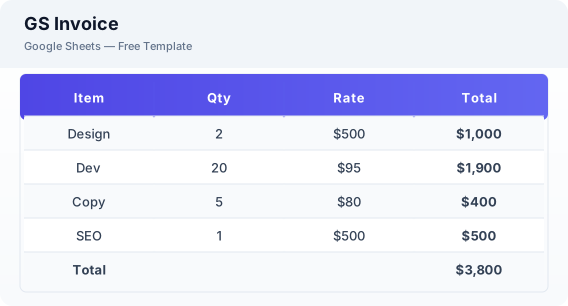
What Is This GS Invoice Template?
This Excel invoice template is a free spreadsheet for creating professional invoices, tracking payments, and managing your billing. It includes automatic calculations, customizable branding, and payment status tracking.
Why Use a Google Sheets GS Invoice Template?
A Excel invoice template gives you professional invoicing without monthly software fees. You can customize it with your branding, send invoices as PDFs, and track payment status — all from your Google account.
When Should You Use This GS Invoice Template?
Use this template whenever you need to bill a client for products or services. It works alongside the invoice tracker for managing multiple invoices and the estimate template for quoting projects before invoicing.
What's Included
- ✓Invoice number & date
- ✓Business & client details
- ✓Line items with description
- ✓Quantity & rate
- ✓Subtotal & tax
- ✓Total due
- ✓Payment status (Pending / Paid / Overdue)
- ✓Payment instructions
How to Use This Template
Who This Template Is For
Available Formats
Excel (.xlsx) — Download the file and open it in Microsoft Excel, Apple Numbers, or any compatible spreadsheet application.
CSV — Download the comma-separated values file for use in data applications, databases, or legacy spreadsheet software.
Customization Tips
- 💡Insert your logo in the header area for a professional branded invoice.
- 💡Create a saved copy with your business details pre-filled for faster invoicing.
- 💡Use the payment status column to track which invoices need follow-up.
Use Cases
- Freelance invoicing
- Small business billing
- Contractor payment requests
Download or Copy
Frequently Asked Questions
Related Templates
Last updated: 2026-06-19