Excel Dashboard Template
Visualize your business metrics with this free Excel dashboard template. Track KPIs, sales, and performance with charts. Also works in Excel. No signup required.
Free
No signup
Excel, CSV
Business
2026-06-19
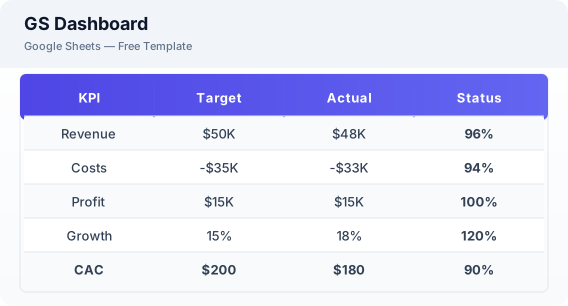
What Is This Sheets Dashboard Template?
This Excel dashboard template is a free spreadsheet for visualizing business KPIs, tracking performance, and monitoring key metrics. It includes interactive charts, KPI summary cards, and trend analysis to help you make data-driven decisions.
Why Use a Google Sheets Sheets Dashboard Template?
A Excel dashboard consolidates your most important business metrics into a single view. Instead of jumping between reports, you can see revenue, expenses, and performance trends all in one place.
When Should You Use This Sheets Dashboard Template?
Use this template for weekly or monthly business reviews, team performance tracking, or executive reporting. It works alongside the project dashboard for project metrics and the KPI dashboard for detailed indicator tracking.
What's Included
- ✓KPI summary cards
- ✓Revenue chart
- ✓Expense breakdown
- ✓Key metrics table
- ✓Monthly trends
- ✓Performance vs targets
How to Use This Template
Who This Template Is For
Available Formats
Excel (.xlsx) — Download the file and open it in Microsoft Excel, Apple Numbers, or any compatible spreadsheet application.
CSV — Download the comma-separated values file for use in data applications, databases, or legacy spreadsheet software.
Customization Tips
- 💡Use Excel chart tools to customize colors and styles to match your brand.
- 💡Add additional KPIs relevant to your specific industry or business model.
- 💡Use slicers to create interactive filters by date range or department.
Use Cases
- Business performance monitoring
- KPI tracking & reporting
- Executive dashboards
Download or Copy
Frequently Asked Questions
Related Templates
Last updated: 2026-06-19