Annual Roadmap Gantt Chart Template for Excel
Plan your year with this free Excel annual roadmap Gantt chart template. Track phases, tasks, milestones, and deadlines across a 12-month timeline with automatic date-driven bars. No signup required.
Free
No signup
Excel
Business
2026-07-12
What Is This Annual Roadmap Gantt Template?
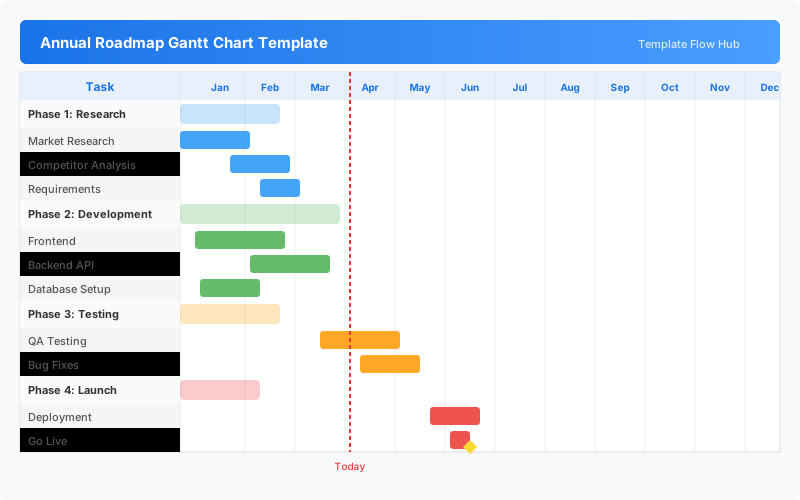
This annual roadmap Gantt chart template is an Excel workbook for planning a full year of work across multiple phases and tasks. It combines a hierarchical WBS task list with a date-driven Gantt timeline spanning 12 months, making it easy to map out quarters, milestones, and delivery dates.
Why Use a Google Sheets Annual Roadmap Gantt Template?
An annual roadmap gives teams and executives a shared view of what gets done and when. This template turns start and end dates into a visual timeline with color-coded phases, so everyone can see how individual tasks fit into the broader yearly plan without needing specialized project management software.
When Should You Use This Annual Roadmap Gantt Template?
Use this template during annual planning sessions, at the start of a new fiscal year, or when kicking off a multi-quarter initiative. It is ideal for creating an executive-ready roadmap that communicates timing, dependencies, and milestones across the full year.
What's Included
- ✓12-month annual timeline with monthly columns
- ✓Multi-phase project breakdown structure
- ✓Task-level rows with date-driven Gantt bars
- ✓Milestone diamond markers
- ✓Work Breakdown Structure (WBS) numbering
- ✓Color-coded task type categories
- ✓Automatic conditional formatting for timeline bars
- ✓Built-in Excel Help sheet with instructions
How to Use This Template
Who This Template Is For
Available Formats
Excel (.xlsx) — Download the file and open it in Microsoft Excel, Apple Numbers, or any compatible spreadsheet application.
Customization Tips
- 💡Rename phases to match your annual planning structure (Q1-Q4, H1-H2, etc.).
- 💡Add more rows above the last placeholder row to extend the task list.
- 💡Adjust column widths to fit longer task names or descriptions.
- 💡Use the WBS column to organize tasks hierarchically.
- 💡Hide completed rows or phases to focus on active work.
Use Cases
- Annual project planning and roadmapping
- Multi-phase initiative scheduling
- Quarterly goal tracking
- Department or team annual planning
- Executive-level program overview
Download or Copy
Frequently Asked Questions
Related Templates
Last updated: 2026-07-12